Create panoramic images with AI + Free virtual tours
Imagine this: you take three or four images of your project or an image of the home you want to sell (for example, dining room, kitchen and bathroom), and with just one sentence in ChatGPT… you already have each 360º panoramic image!
And now… Do you want to show the client a 360 panoramic tour between rooms? Well, we have built a small tool to create free virtual tours, completely free, and you can even add a floor plan or send it to the client.
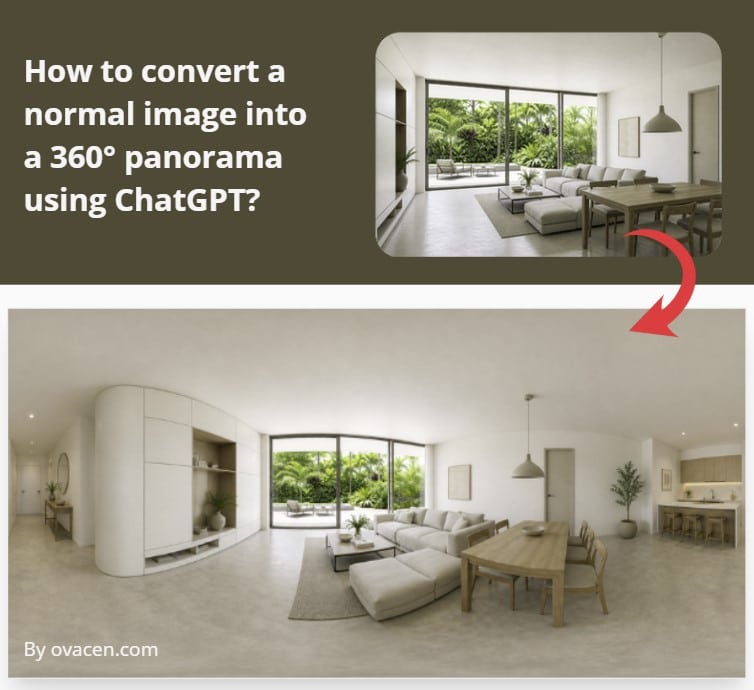
But first, let’s see how to make a 360 panorama with artificial intelligence …
Turn a photo into a panorama with AI – ChatGPT
With the new ChatGPT image model (Image 2), it is possible to convert a photo into panoramas with AI, obtaining coherent results without distorting the context.
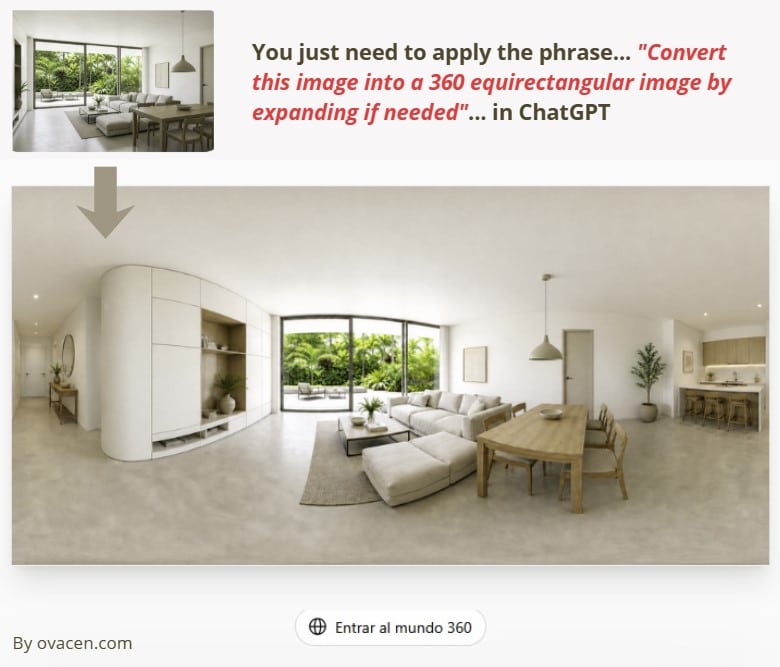
You just have to follow these steps:
- ChatGPT Images. First, go to ChatGPT images. In the chat itself: select the “Create an image” option and, for better reasoning consistency, choose “Thinking”
- Upload image. Upload the photo you want to convert into a panorama. For best results, use a rectangular image (perfect 2:1 ratio, although not mandatory) and with good perspective.
- Apply prompt. You only have to add the following phrase in the ChatGPT chat… “Convert this image into 360 equirectangular image by expanding if needed”
- Run ChatGPT. Click on “Send prompt” so it can process it. And you will get the perfect 360 panorama.
Some tips that can help you improve the results of the 360 panoramic image:
- When you generate a panorama and click on the image itself to enlarge it, you will have a top tab with the “Select” option, which is used to retouch the image and tell the chat if you want to change something.
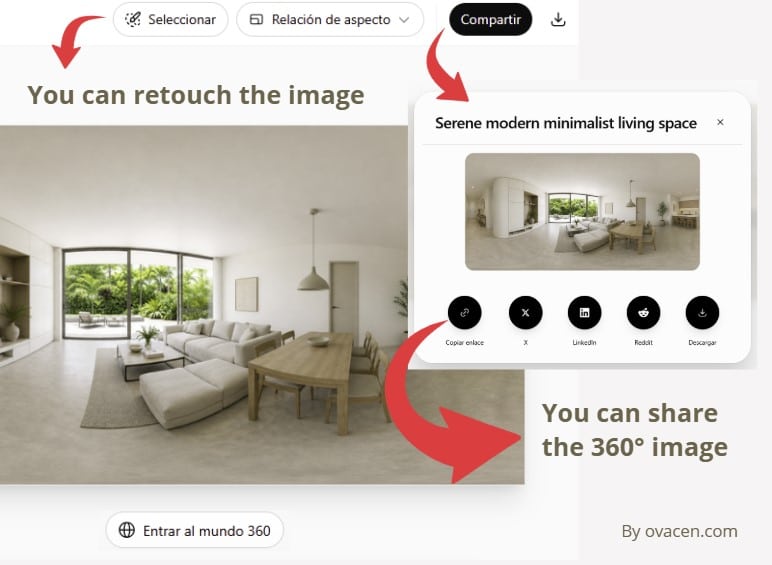
- Once you have obtained the 360° image, you can ask ChatGPT with the following prompt:
Upscale this image to 2K while preserving the original image exactly. Keep all original details, textures, lighting, colors, perspective, composition, and aspect ratio unchanged. Do not add, remove, redraw, stylize, or reinterpret any element. Only increase resolution and improve clarity naturally. Avoid artificial sharpening, hallucinated details, smoothing, denoising artifacts, halos, or changes in geometry. For a 360° equirectangular panorama, output at 2048 × 1024 px with a 2:1 aspect ratio.
Although ChatGPT cannot generate a file of that actual size, this instruction “pushes” the AI to define the details better
Google Gemini (Pro version) is capable of achieving better quality (maximum 2K). You can access it for free from ARENA. Select the Pro model at 2K, then upload the 360 image in the chat and add the previous prompt. You will have a higher-quality panoramic image!
🟧 Note: Don’t waste time trying different prompts or methods to improve photo quality, because I have already tested them. Either Gemini Pro or specialized tools are the best solution.
Free software for 360º panoramas and tours
We have had an article for some time about creating a 360 Virtual Tour with different tools (we have also added this new one), but this time, we have built our own. And we are giving it to you directly!
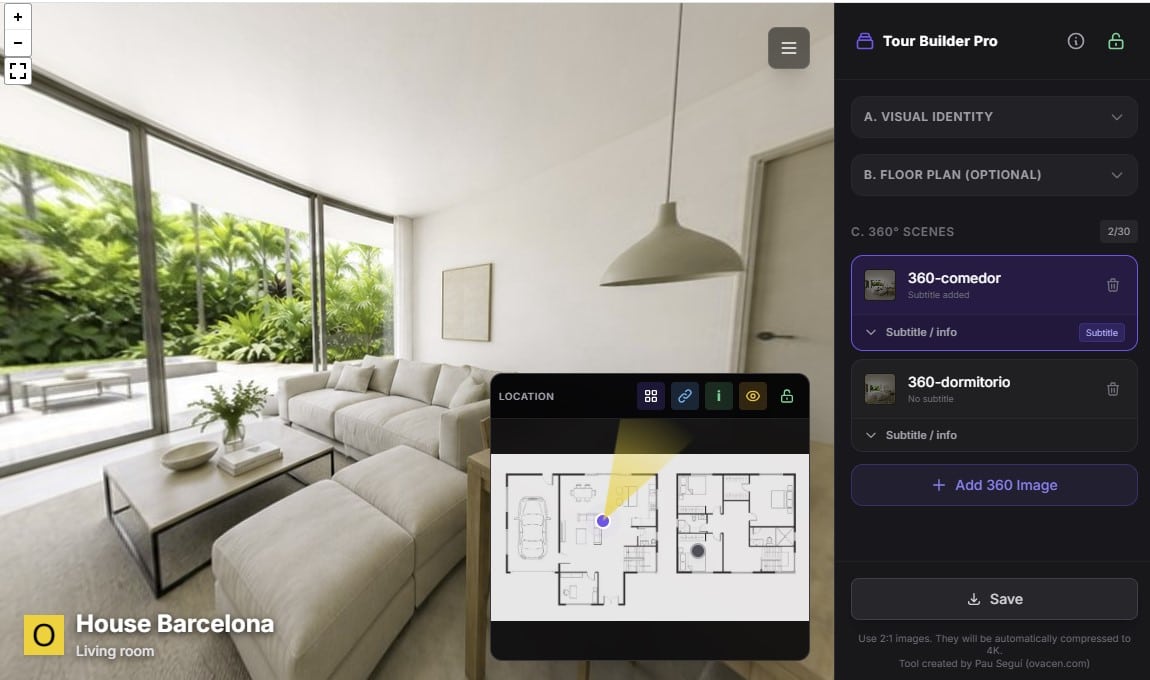
With this tool you can create as many panoramic virtual tours as you want, completely free from your computer!
An advanced, free and open-source tool to create interactive 360° Virtual Tours. It works 100% in the browser (no database or server), packaged in a single HTML file.
- You can view and test the online application from GitHub (English version). We have made it Open Source; repository HERE.
- You can download it in English from HERE (compressed file with a single .html file)
🟧 Note: Keep in mind that no image is saved while working only in your browser. When you save a Tour, the downloaded file does include the images inside the download file itself. Any questions, leave them in the comments of this article.
It is ideal for real estate agencies, photographers, architects or anyone who wants to showcase spaces in 360 degrees professionally and without recurring costs from third-party platforms…. What options does “Tour Builder Pro” offer?
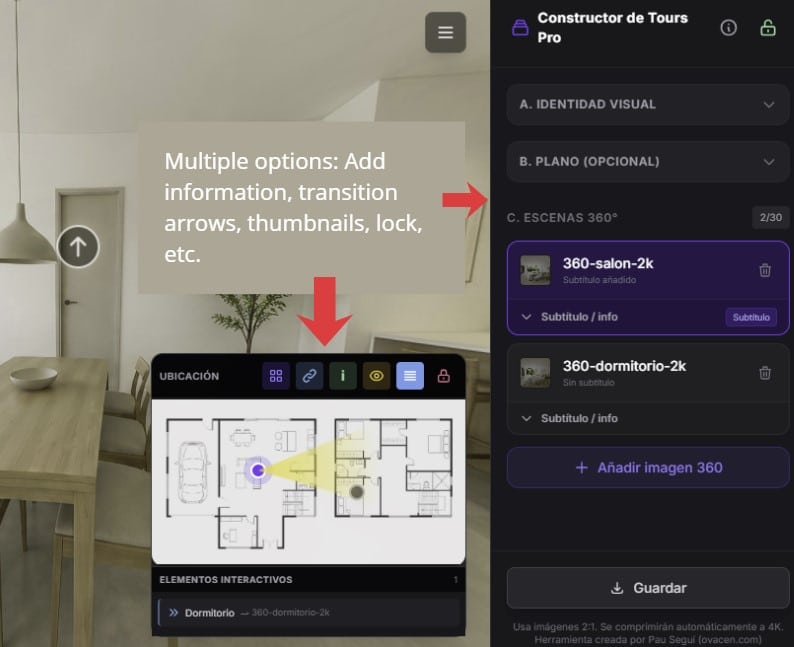
A. Visual identity
- Upload a custom logo.
- Define a main title for the tour.
- Change the title color.
- Change the title size: small, medium or large.
- Customize the color of the pointers or hotspots.
- Activate a 2:1 panoramic frame.
- Change the frame color.
- Adjust the frame thickness.
- Adjust the outer margin of the frame.
B. Floor plan or minimap
- Upload or drag in a 2D floor plan.
- Show an interactive minimap.
- Place scene markers on the floor plan.
- Lock or unlock map point editing.
- Use the minimap as a location system during the tour.
C. 360° scenes
- Add 360° panoramic images.
- Drag images directly onto the interface.
- Automatically compress images to 4K format.
- Manage up to 30 scenes.
- Select scenes from a list.
- Delete scenes.
- Add a subtitle to each scene.
- Add an informational description associated with the “i” icon.
D. Hotspots and navigation
- Add navigation arrows between scenes.
- Choose the destination scene for each arrow.
- Add optional text to each arrow.
- Use an advanced setting to define the exact arrival view.
- Configure the entry view when changing scenes.
- Check and delete created transitions.
- Add informational hotspots on specific objects or areas.
E. Calibration and radar
- Set the starting point of a scene.
- Adjust the initial view of each 360° photo.
- Calibrate the orientation of the minimap radar.
- Rotate the radar arrow so that it matches the viewing direction.
F. Presentation mode and preview
- Hide the editor to view the tour as the final user.
- Activate preview mode.
- Show presentation controls.
- Show or hide the thumbnail gallery.
G. Gallery
- Show a bottom bar with thumbnails.
- Quickly jump between rooms or scenes.
- Visually browse all uploaded images.
H. Saving and export
The tool allows you to save the tour in three formats:
- Single HTML file for client: A clean tour in a single file, designed to be easily shared with the client (the configuration sidebar is not included).
- Editable project for Administrator: A file designed for the administrator – creator. Complete Tour. Everything in 1 file – For administrator (with Sidebar for editing)
Optionally, it also allows you to choose whether or not to include the custom logo in the export.
Is it a perfect tool?… Well, no, but I think it has turned out professional and useful enough to be used with your clients. And remember that with artificial intelligence we can be more efficient in our architecture firm, for example, by using a free AI floor plan generator.
If you liked the article, share it!