Alternatives to AutoCAD
If you are looking for alternatives to AutoCAD based on free software that does not cost you a single euro for 2D and 3D technical drawing, architectural or industrial modeling — there are several good options!
In fact, since the arrival of AI there are proposals to replace AutoCAD with free open source programs that are genuinely solid, run in the browser, and even deliver AI-assisted 3D modeling.
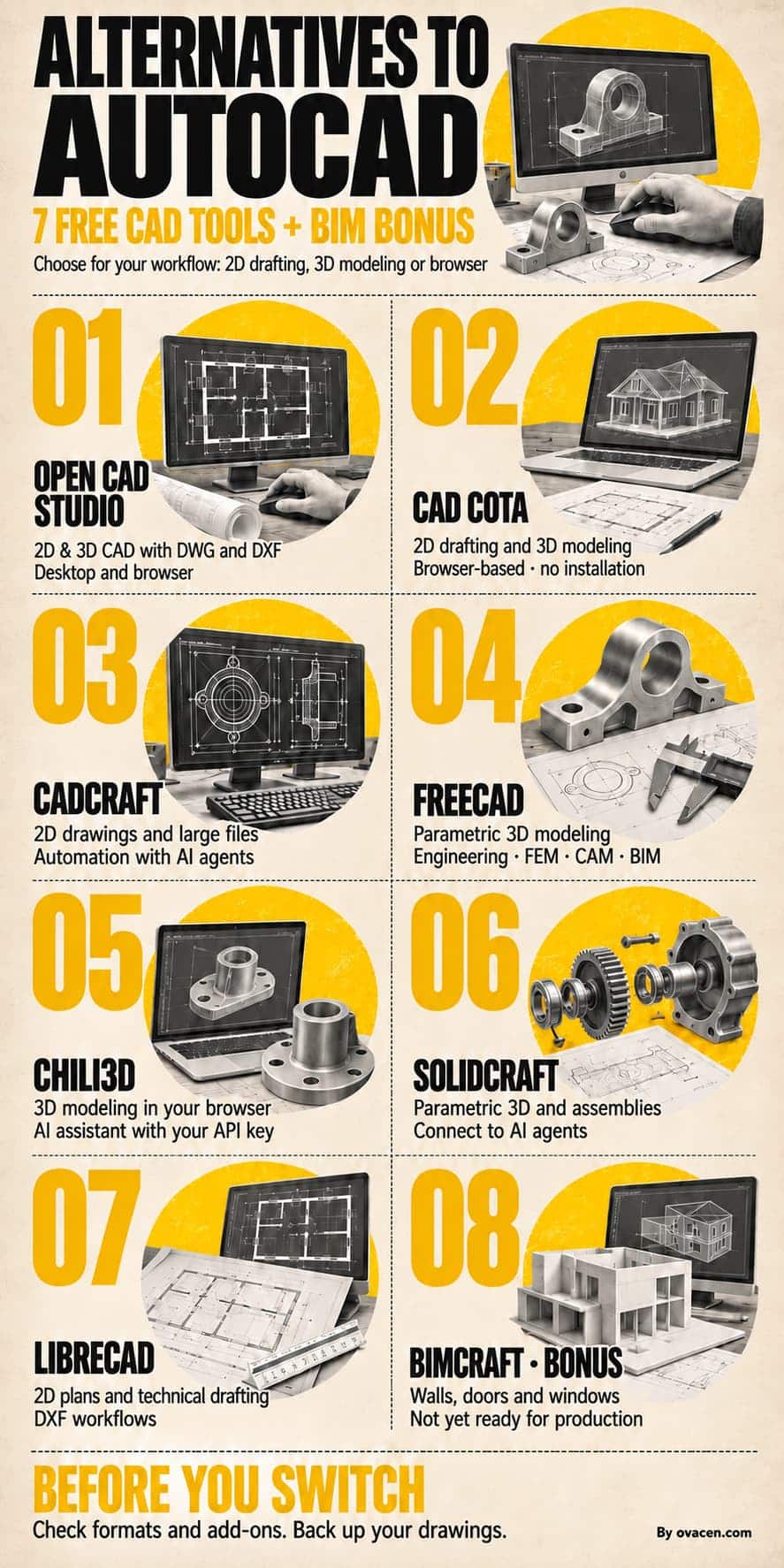
Key points, in our opinion, on the free CAD alternatives:
- Best for professional parametric 3D: FreeCAD (35,000+ stars on GitHub, LGPL-2.1 license, the most mature of the bunch).
- Best for opening and saving native DWG: Open CAD Studio (read and write R14–2018) and CADCraft (opens DWG R13–2018 and writes DXF).
- Best for pure 2D and stability: LibreCAD, an active project since 2011.
- Best with nothing to install: Cota, Chili3D and SolidCraft run in the browser; Open CAD Studio and CADCraft also offer a web version.
- Best with built-in AI: Chili3D (its own in-browser assistant) and SolidCraft and CADCraft (MCP protocol for external agents).
- Important warning: Cota, CADCraft, Open CAD Studio and SolidCraft are recent projects under active development — back up your drawings!
1.- Open CAD Studio
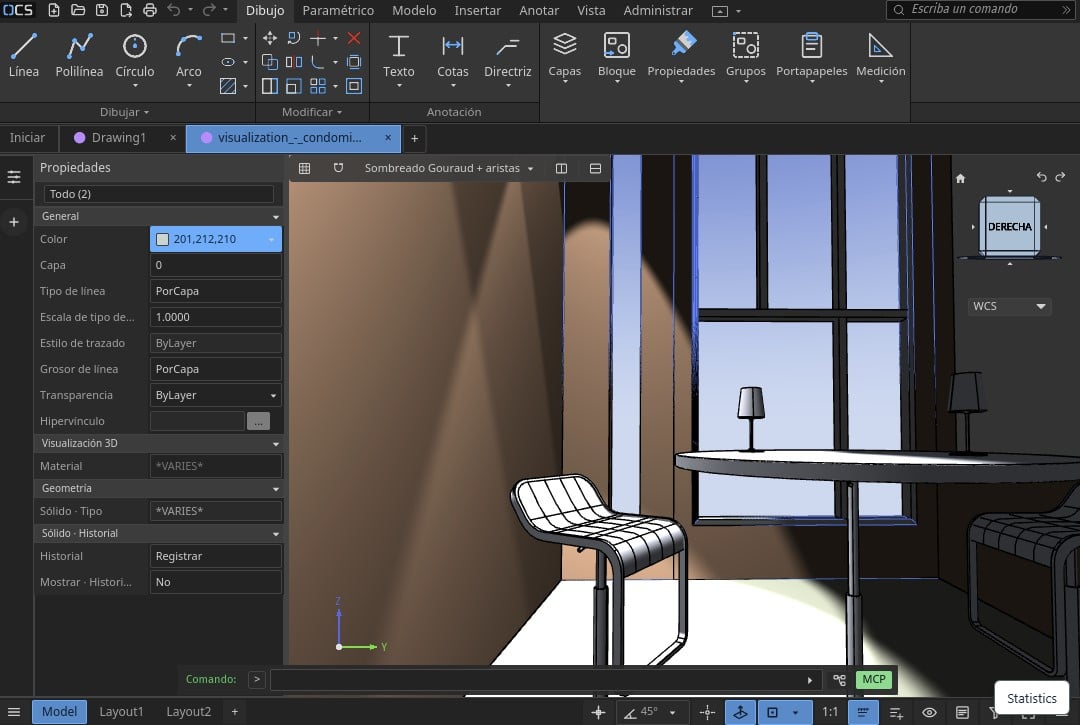
Open CAD Studio is probably the most direct replacement for AutoCAD software, and the only one that opens and saves DWG natively, with no external conversion service. It runs on the desktop for Windows, Linux and macOS and also in the browser.
- ➡️ Web: opencadstudio.com
- Online web app in the browser: opencadstudio.com/app
What it does well
- Native DWG and DXF. It reads and writes both formats.
- A complete 2D workspace. Layers, blocks, external references, hatches, object snaps, ortho tracking, text, dimensions, leaders, tolerances, etc.
- Real paper space. Viewports, plot styles and PDF output in the desktop version.
- 3D modeling with a geometry kernel. Primitives, extrusions, revolutions, sweeps, lofts and boolean operations resolved by the kernel.
- GPU-accelerated rendering with
wgpu, with orthographic and perspective cameras. - Real automation. Native plugins, command scripts, headless-mode conversion and a line-based JSON API.
- 23 interface languages — including Spanish!
What you should know
Its own documentation recommends backing up the drawings you work on in production, especially when you work directly with the web browser.
The web version lets you work without an account and without installing anything; for large drawings or system integrations, the desktop app is the better option!
Ideal for: architects, drafters and technicians who currently work with AutoCAD and need to open client DWG files without converting them.
2.- CAD Cota
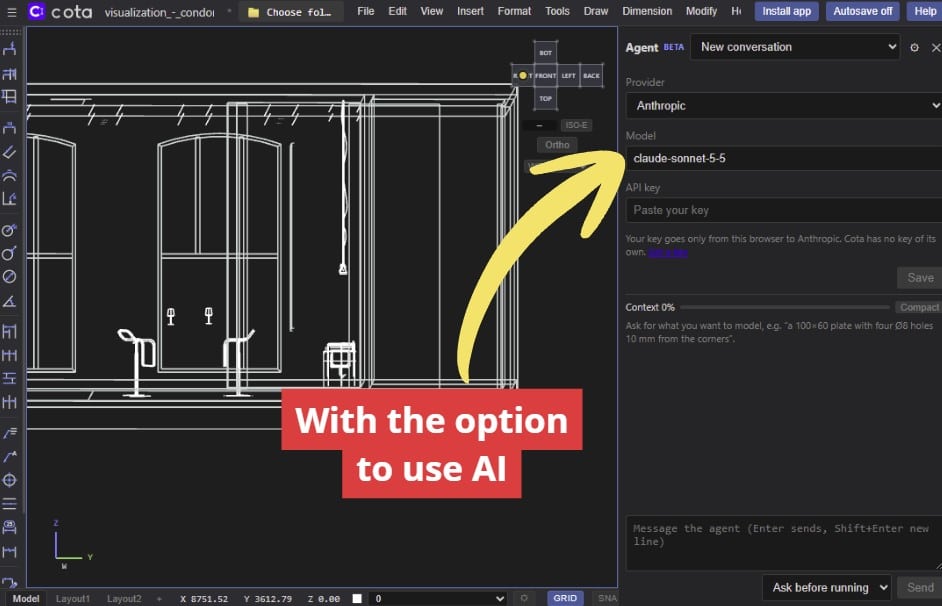
Another of the alternative CAD programs is Cota (the name is the Spanish word for a dimension on a technical drawing). It is a complete 2D and 3D CAD that runs in the browser, with no installation and no account. The youngest project on the list.
- ➡️ Web: mxchristian17.github.io/cota
- Code: github.com/mxchristian17/cota
What it does well
- 240+ commands with a command line, history and autocomplete. The workflow is that of classic AutoCAD: you type
LINE,CIRCLE,EXTRUDE,TRIMand follow the prompts. - 2D and 3D in the same drawing. Extrusions, revolutions, booleans, edge fillet and chamfer, 3D arrays, visual styles and named views.
- From model to drawing. Base and projected views generated from the 3D model, hidden lines, shaded views, title blocks with fields and vector PDF output.
- Advanced and automatic dimensioning. Linear, aligned, angular, radius, diameter, jogged/ordinate, baseline, continued and automatic dimensions, plus dimension styles and annotative scales.
- Complete drawing production. Layouts, paper space and scaled viewports.
- 23 classic toolbars, dockable to any edge or floating.
- Installable as a PWA to work offline, with native
.cotafiles on your disk. An optional server adds accounts, cloud storage and DWG conversion.
🟧 Note: We have an extensive article with multiple resources for downloading AutoCAD blocks — you will not regret it!
What you should know
Being a recent project, its support for interchange formats is more limited than in Open CAD Studio or FreeCAD. Its author, Christian Ezequiel Orengia, presents it as a tool for students, teachers, makers and professionals
Ideal for: anyone who wants a complete 2D/3D CAD in the browser without installing anything, and for teaching use.
3.- CADCraft
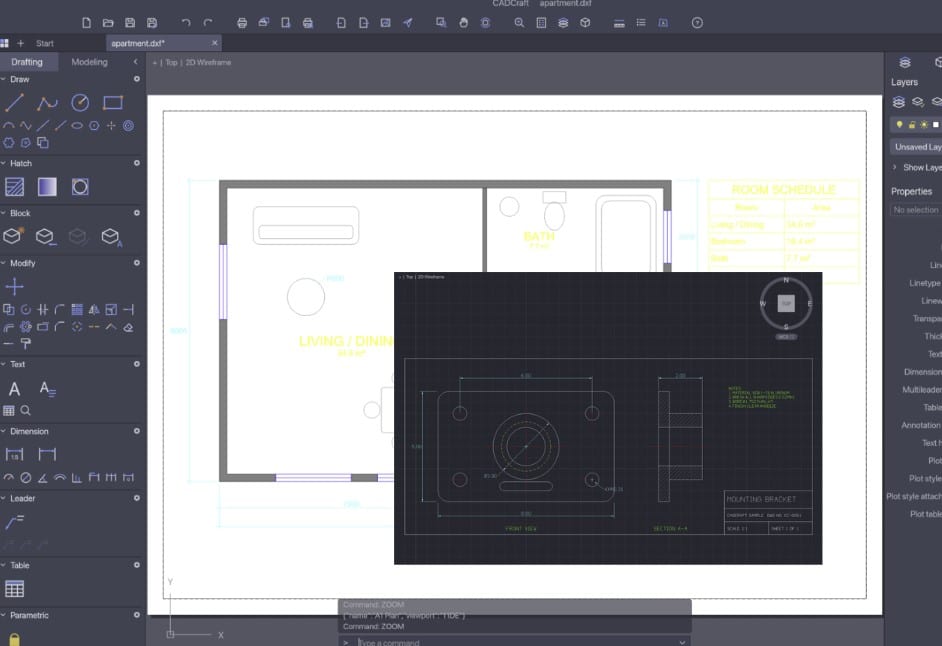
CADCraft is a drawing and modeling CAD, maintained by the ArtCraft team, under a dual MIT or Apache-2.0 license (the repository includes the LICENSE-MIT and LICENSE-APACHE files). It is one of the projects most appreciated by users.
- ➡️ Web: getartcraft.com/apps/cadcraft
- Code: github.com/storytold/cadcraft
What it does well
- Industrial-grade performance. It opens very large DXF files smoothly and offers a portable folder: unzip, run, and you install nothing.
- A familiar drafting workflow. Command line, object snaps, layers, dimensions, hatches, blocks and drawings that behave the way you are used to from AutoCAD.
- Paper space and floating viewports, with per-viewport layer overrides, page setup and plotting at exact scale.
- Associative annotations: linear, aligned, angular and radial dimensions that follow the geometry when you edit it; multileaders; tables; custom text styles.
- Hatches by pick point with islands, pattern fills, block definitions with attributes and nested blocks.
- Geometric and dimensional parametric constraints with expression parameters that recalculate as you edit.
- AI agents and CLI via the MCP protocol.
What you should know
It has a very complete suite and is part of an ecosystem with many more tools; for CAD use, it is top-notch!
Ideal for: technicians who open large third-party drawings and need to review them quickly, and for teams that value a permissive license (MIT/Apache-2.0) for commercial use.
4.- FreeCAD
FreeCAD is the most established open source alternative to AutoCAD in the technical landscape. It is a cross-platform 3D parametric modeler for Windows, macOS and Linux, governed by the FreeCAD Project Association.
- ➡️ Web: freecad.org
- Code: github.com/FreeCAD/FreeCAD
What it does well
- True parametric modeling with an Onshape/Fusion-style feature tree: when you change one top dimension, everything that depends on it recalculates.
- Mature workbenches: Part, PartDesign, Sketcher, Draft, BIM, FEM (finite element analysis), Path/CAM, Spreadsheet, Robot, Inspection and Points.
- OpenCASCADE geometry kernel, with import and export of STEP, IGES, STL, OBJ, BREP, DXF and SVG.
- Automation with Python: macros, scripts and a Python console, plus an add-on manager with a community catalog.
- Huge community and documentation translated into Spanish, wiki, forum and active community channels.
What you should know
FreeCAD does not open DWG natively: the usual workflow is to convert with ODA File Converter, LibreDWG or an external bridge. Its learning curve is the steepest of the group, because the concept of a parametric sketch + feature tree has no direct equivalent in AutoCAD.
Ideal for: mechanical engineering, industrial design, architecture with BIM, and any workflow where parametric modeling and finite element analysis matter more than DWG compatibility.
5.- Chili3D
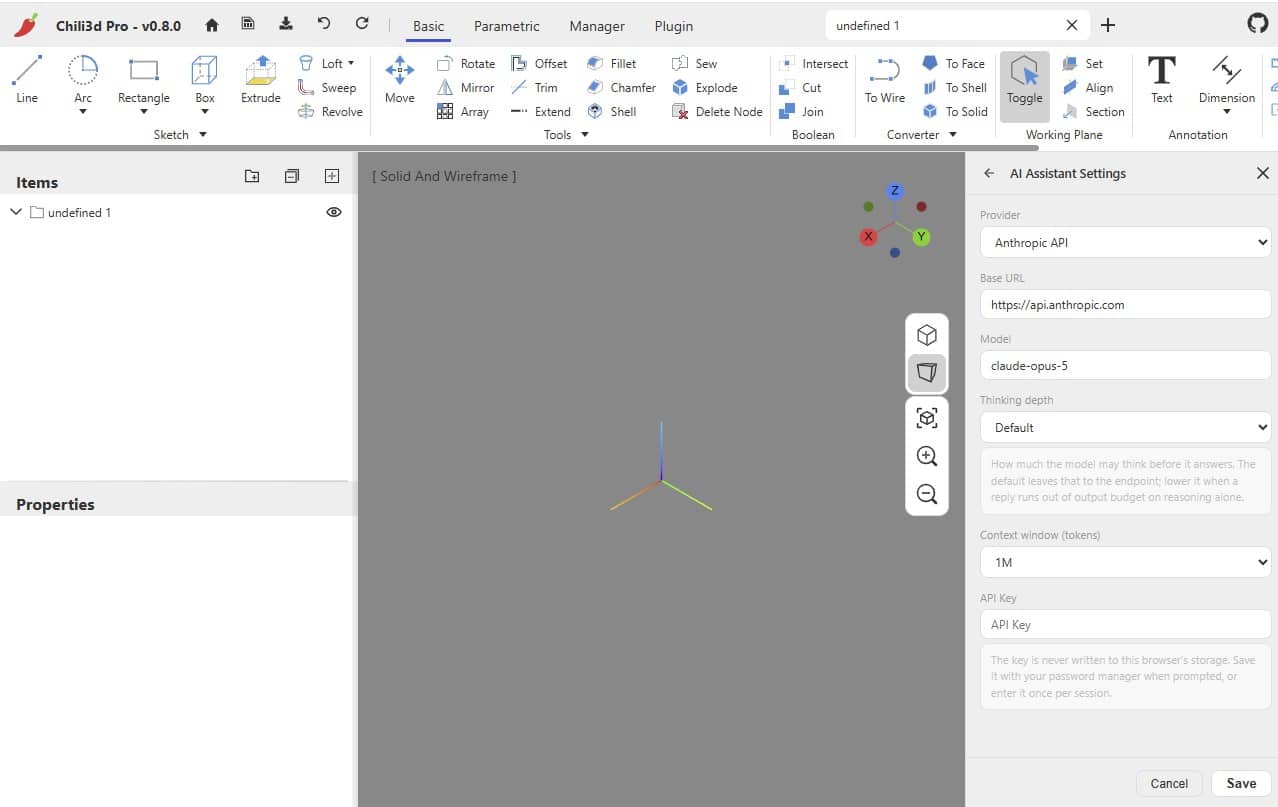
Chili3D is a 3D CAD that runs entirely in the browser. It offers near-native performance without installing anything. It is the oldest of the “web” projects on this list.
- ➡️ Web: chili3d.com (When you enter, to see the online program, click “New Document” in the left sidebar)
What it does well
- Native AI, not a panel stuck to the side. The assistant runs in the browser and can call an LLM directly (Anthropic or OpenAI) with your own API key (the key is only kept for the session).
- Two modeling paths.
run_programapplies operations and produces geometry (one call = one undo step);run_parametricbuilds a feature tree you can edit later. - Real document context. The assistant reads the tree, the geometry and the current selection, and captures viewport snapshots to resolve requests such as “make this flange thicker” on the correct nodes.
- Reference images: you can paste a photo and the model works from it.
- External agents: the
?bridge=<port>parameter connects the page to a local process over WebSocket (outgoing port 17373) that gives external access to the tool registry.
What you should know
In this application we can use what is called AI for architecture through the corresponding API and create 2D or 3D models with artificial intelligence.
Ideal for: collaborative 3D modeling with no installation, rapid prototyping, and teams that want to drive AI applied to CAD.
6.- SolidCraft
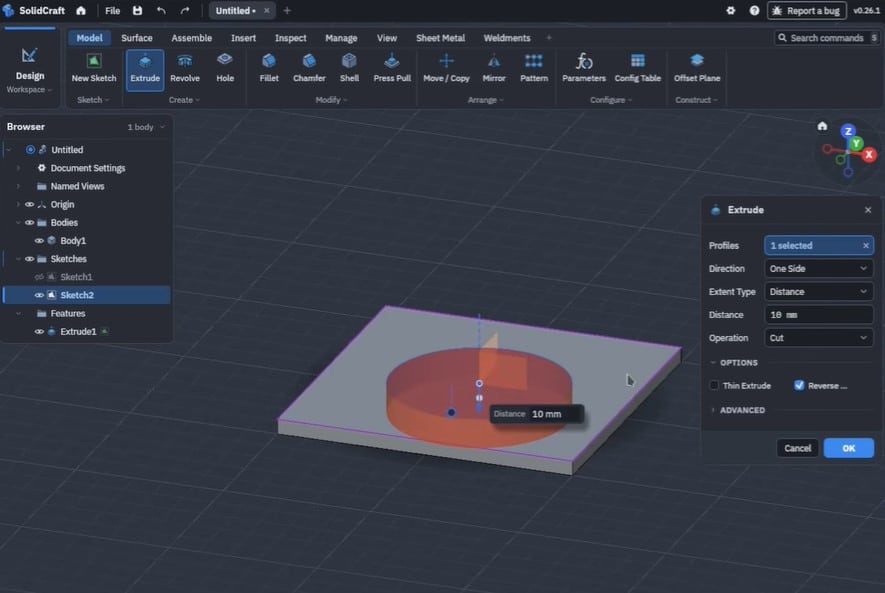
SolidCraft is a parametric 3D CAD and the second project on the list with the most user ratings on GitHub. It runs on Windows, macOS, Linux and FreeBSD, and also in the browser.
- ➡️ Web: solidcraft.io
What it does well
- SolidCore, its own geometry kernel, is a Rust port of SMLib, NVIDIA’s open source library. This sets it apart: the others use OpenCascade, while SolidCraft keeps the kernel in-house.
- Real constrained sketching: dimensions, angles and geometric constraints.
- Editable feature history. Change a named parameter (housing height, wall thickness) and the model rebuilds in cascade.
- Assemblies and joints, with combined components and configurations.
- Content-aware format interchange: it distinguishes which formats preserve editable history, which preserve solid geometry and which only preserve the mesh.
- Model Context Protocol (MCP) to connect AI agents that run modeling commands, measure geometry and export files.
What you should know
It is a very recent project: the repository was created in 2026, so its version history is still short, though very active.
Ideal for: anyone looking for modern 3D parametrics with a permissive license, full control over the kernel and a solid bridge to AI agents.
7.- LibreCAD
LibreCAD is the classic reference for free 2D CAD: it runs on Windows, macOS and Linux and is available in more than 30 languages. It is a purely 2D project and was born with the goal of adding CAM capabilities for a CNC router.
- ➡️ Web: librecad.org
- Code: github.com/LibreCAD/LibreCAD
LibreCAD’s DWG support is single-proprietary. It reads DWG, but the result of writing may not preserve everything you expect.
What it does well
- Stability: more than a decade. The current stable release is v2.2.1.6, dated October 17, 2026, with a later release candidate.
- DXF and DWG reading, and writing to DXF, DWG, PDF and SVG.
- Complete 2D primitives: point, line, circle, ellipse, parabola, hyperbola and spline.
- Highly customizable interface and a large community with forum, wiki and IRC.
- Single-proprietary DWG files, something unusual in free software.
What you should know
It has no 3D modeling. If your work requires solids, surfaces or parametrics, LibreCAD is not the alternative. And since it is GPL-2.0, if you modify it and redistribute it, you must also distribute your changes under the same license.
Ideal for: 2D plans, architecture, drafting and drawing typography, in any purely documentary workflow.
Comparative table of the best open source CAD programs
The following table summarizes the free alternatives to AutoCAD analyzed, with the most notable features according to what we have been able to verify:
| Tool | License | Type | Platforms | Key formats | Best for |
|---|---|---|---|---|---|
| Open CAD Studio | GPL-3.0 | 2D + 3D | Windows, macOS, Linux and web | DWG and DXF (read and write, R14–2018), OBJ, STL, PDF | Replacing AutoCAD 2D/3D with native DWG |
| CAD Cota | Apache-2.0 | 2D + 3D | Browser (installable PWA) | Own .cota file, DXF, DWG via optional server | Technical drawing and modeling in the browser |
| CADCraft | MIT or Apache-2.0 | 2D (+3D on the roadmap) | Windows, macOS, Linux, FreeBSD and web | DXF (R12–2018, ASCII and binary), DWG (R13–2018), PDF, SVG, PNG | 2D drafting with DWG |
| FreeCAD | LGPL-2.1 | 2D + parametric 3D | Windows, macOS, Linux | STEP, IGES, STL, OBJ, BREP, DXF | Mechanical engineering, FEM, CAM and BIM |
| Chili3D | AGPL-3.0 | 3D | Browser (WebAssembly) | STEP, STL and meshes | 3D modeling in the cloud with an AI assistant |
| SolidCraft | Apache-2.0 | Parametric 3D | Windows, macOS, Linux, FreeBSD and web | STEP, meshes and native editable design | Parametric 3D and AI agents |
| LibreCAD | GPL-2.0 | 2D only | Windows, macOS, Linux | DXF and DWG (read), write DXF, DWG, PDF and SVG | 2D plans, architecture and documentation |
🟧 Note: If you want to learn, look the article on making house floor plans with AI for free.
“Free” does not mean “without a total cost”. Migrating costs the team hours. The real savings show up when you stop paying a per-user subscription
How to choose the AutoCAD alternative according to your use case
There is no single winner. The decision depends on… what do you do with AutoCAD today?
- You draw 2D plans and open client DWG files. Start with Open CAD Studio (native DWG writing) or CADCraft (performance with large files). If you already work with DXF, LibreCAD is the most stable option.
- You model parametric 3D parts. FreeCAD if you want a mature ecosystem with FEM, CAM and BIM; SolidCraft.
- You do not want to install anything. Cota for complete 2D+3D in the browser, Chili3D for 3D with AI, SolidCraft for parametric 3D.
- You need AI to speed up modeling. Chili3D if you want a conversational assistant inside the editor; SolidCraft or CADCraft if what you want is to connect an external agent via MCP.
- You work on Linux and cannot install AutoCAD. All seven options are valid, but LibreCAD and FreeCAD have the most polished packages and the best documentation.
- You need BIM. None of the seven is a complete BIM tool. See the section on BIMcraft further down.
- Check the plug-ins. If you depend on the AutoCAD plug-in ecosystem, verify beforehand which replacement exists
Remember that not all free programs read and write DWG, AutoCAD’s native format — in many cases they work with DXF!
Bonus: BIMcraft, the leap towards BIM
If you need to use BIM on your projects, the ArtCraft ecosystem has published BIMcraft (Apache-2.0 license) for parametric modeling of walls, doors, windows, views, etc., and it runs in the browser or on the desktop.
Does it replace Revit or the already established platforms? I think it is still premature, but the most interesting part is not the features — it is what lies underneath: open formats and open source
We include it as a bonus because it is not production-ready yet. But it is the clearest sign of where free CAD is heading.
- ➡️ Web: getcadcraft.com/apps/bimcraft