Decorate with artificial intelligence AI
One of the clearest trends in the world of interior design is the new programs to decorate with AI (artificial intelligence). Both for professionals and decoration enthusiasts, we can create multiple designs quickly, for interior and exterior, and with various styles.
Do you want to use the best AI applications for decoration? We show you the most useful tools we have tested…
1.- LookX AI
One of the best interior design programs with AI is LookX AI. It is highly specialized in the architecture and interior design sector.
You can transform sketches you have made in pencil into 3D rendered models, or upload a photograph and transform it into the decorative style you deem appropriate.
It is the AI decoration application where you can perform the most tests—you can generate up to 100 tests!
This interior design with AI tool is a bit more complex to use than others in the sector, but the results are truly good due to its high customization.
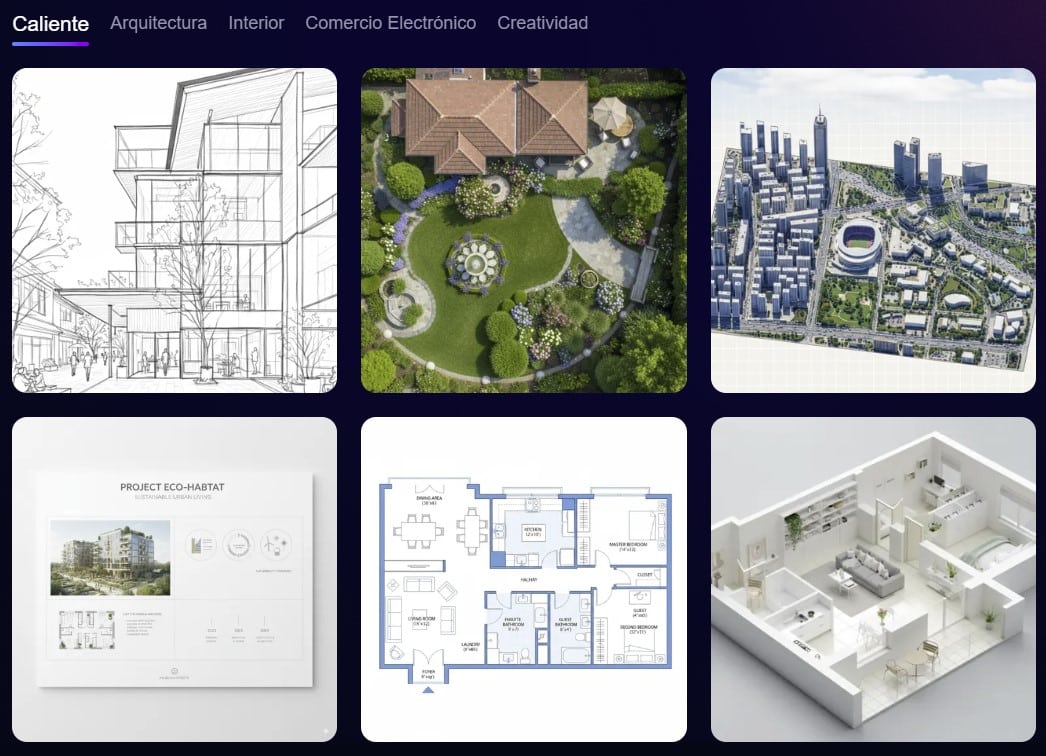
You can access this AI for decorating from LookXIA from HERE. We leave you some benefits and disadvantages we have seen:
🟧 Note: See the tools to view the Sun’s path, building shadows, psychrometric chart, natural interior lighting study, and many more, in our solar analysis article.
2.- Prome AI
Another application with artificial intelligence for decorating is Prome. A robust software that focuses on three areas:
- The interior design with a wide variety of styles.
- Creation of visualizations for all types of constructive elements from the exterior and gardens.
- The field of image retouching at its best.
This application is especially good at turning a sketch or draft into an interior design with some decorative style
For interior decoration with artificial intelligence, it has interesting qualities compared to other tools in the same sector.
In the following two images, we can see the capabilities of this software for interior and exterior design:
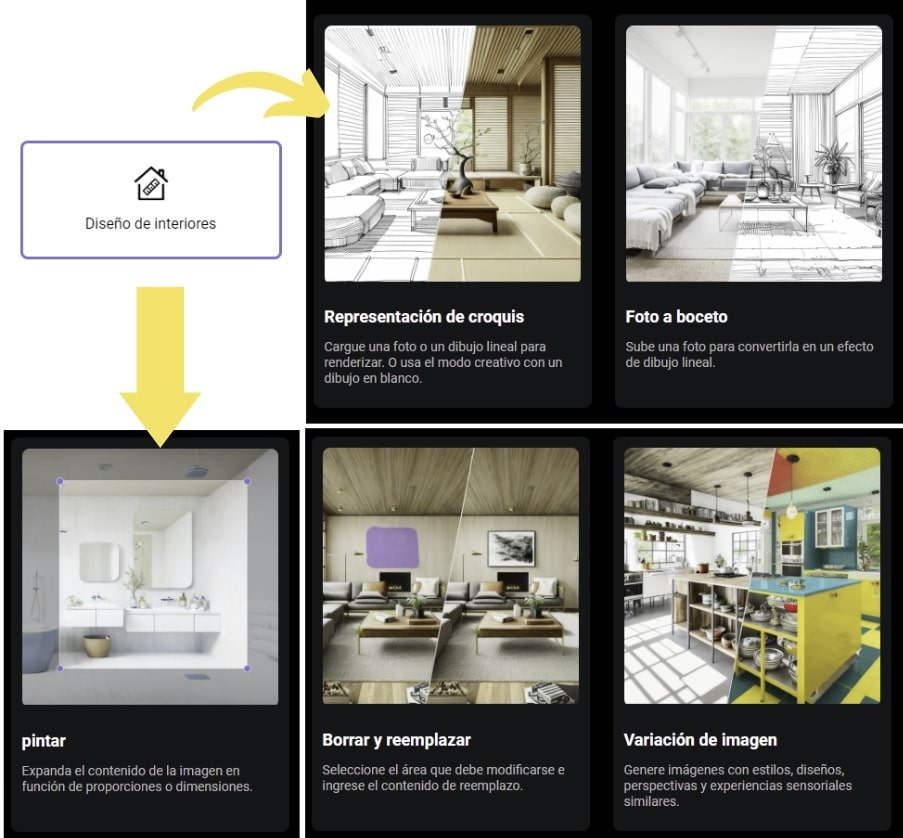
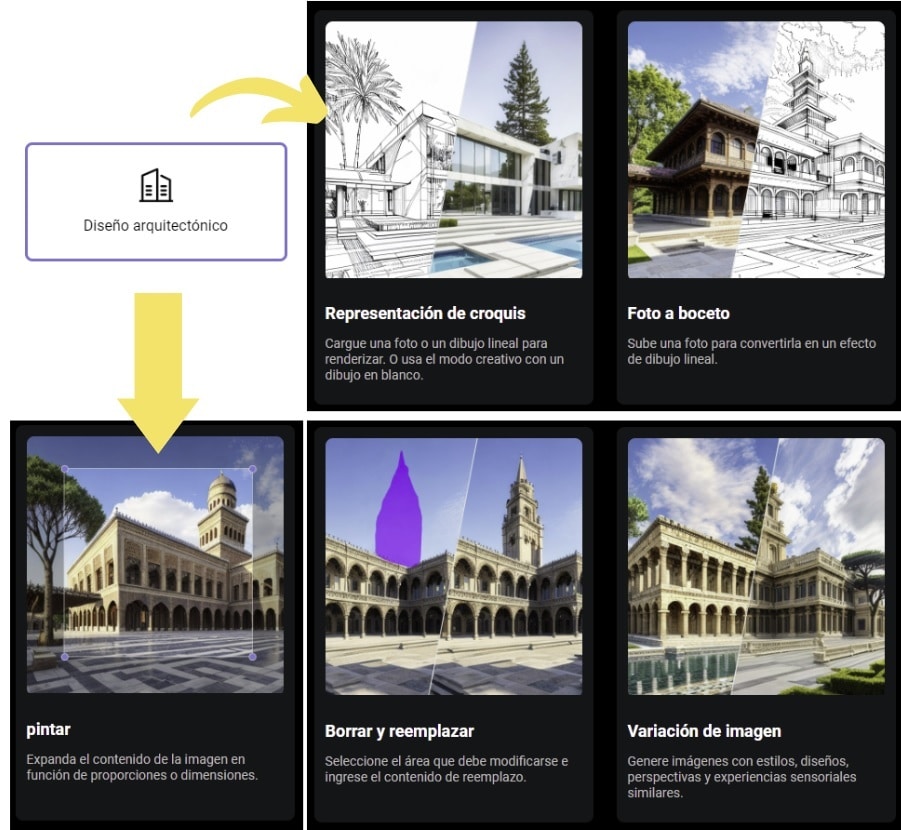
We can access the Prome AI tool from HERE… You have to try it ¡Totally recommended!
🟧 Note: If you are interested in creating plans quickly, you can check our article on various AI tools for making house plans.
3.- Homestyler
It is one of the best-known programs in the field of decoration for creating interior design projects in 2D and 3D. It is mainly designed to create a project from scratch:
- First, you draw the floor plans in 2D.
- The rooms are decorated according to the user’s needs.
- Create 3D modeling and apply decorative styles based on AI
Although it does not focus exclusively on artificial intelligence, we want to highlight it for its multiple facets, design options, and its extensive library of furniture and decorative items.
This software is designed both to work on desktop and in its mobile versions with the app for interior design with AI for iOS or Android.
In the 3D visualization, the tool allows you to see the designs from different angles and apply artificial intelligence according to the decorative style, allowing a fairly realistic visualization.
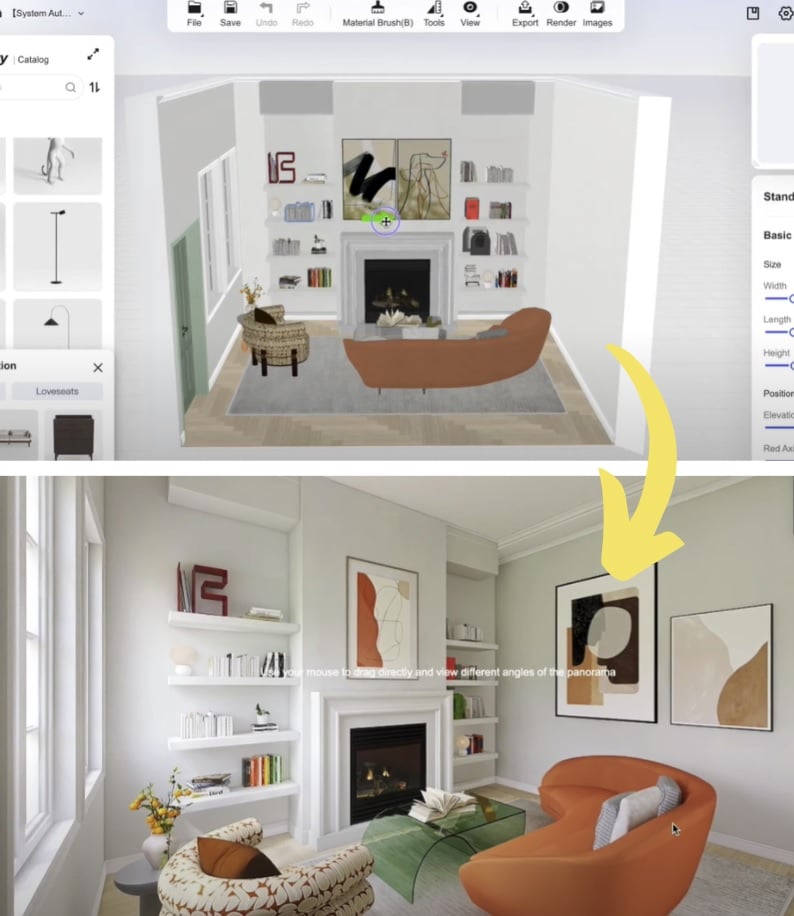
We can see the Homestyler program from HERE (Inside you will also find access to mobile apps).
4.- Reimagine Home
The core of this tool is “reimagine your space” very quickly. Another online interior design program with AI simple but effective in its design results.
It has an interesting quality, it allows you to select the objects you want to be distorted in the 3D rendering performed by the AI.
This decoration software allows you to select the elements you want to transform when the AI renders the interior or exterior decoration
It is an interesting virtue that allows, for example, in exterior decoration areas, to maintain the design of the house entirely but radically change the garden area with different proposals that the software can provide.
The tool recognizes very well what are the decoration and furniture elements, or the structural elements such as walls. We can access the Reimagine tool from HERE to perform tests ¡We were pleasantly surprised!
5.- Remodeled
Another tool specialized in interior design with AI focusing exclusively on rooms, that is, only for interior spaces, it is not suitable for decorating exterior spaces.
Apart from being able to select the decorative style and the type of room we are going to process, we can select the materials and color palette that the room will have (Only in Pro version). Two examples we have tested in this artificial intelligence app for decorating, with industrial and minimalist style based on different images…
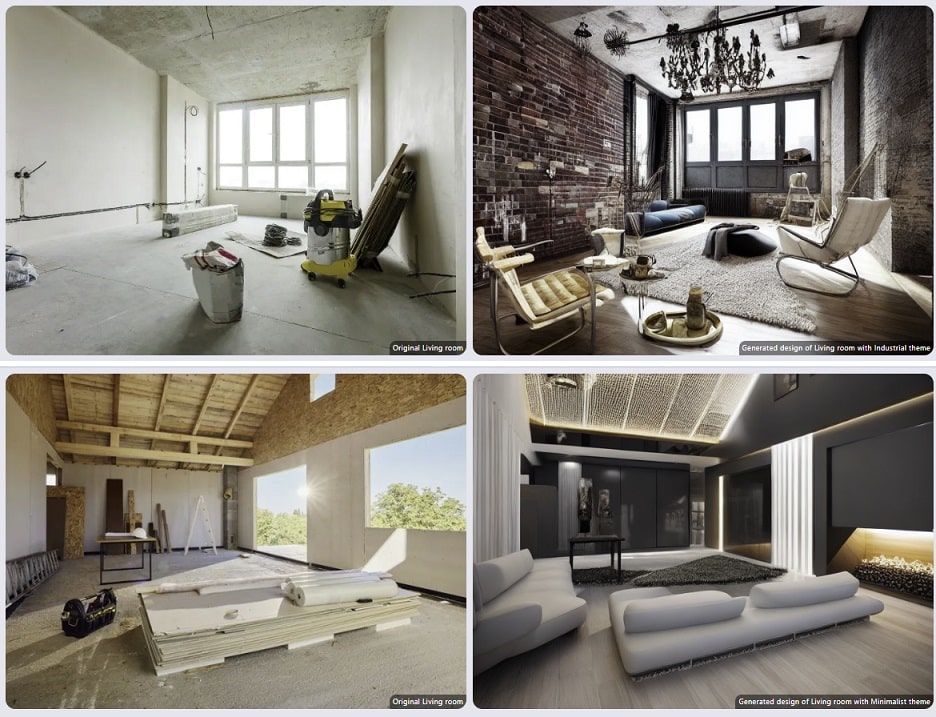
You can access the online application of Remodeled AI from HERE. We leave you some benefits and disadvantages we have seen:
6.- Home Designs AI
Other software you can decorate with AI is Home Designs. This online tool is divided into three sections; creation of interior spaces, for outdoor environments and a special section for gardens.
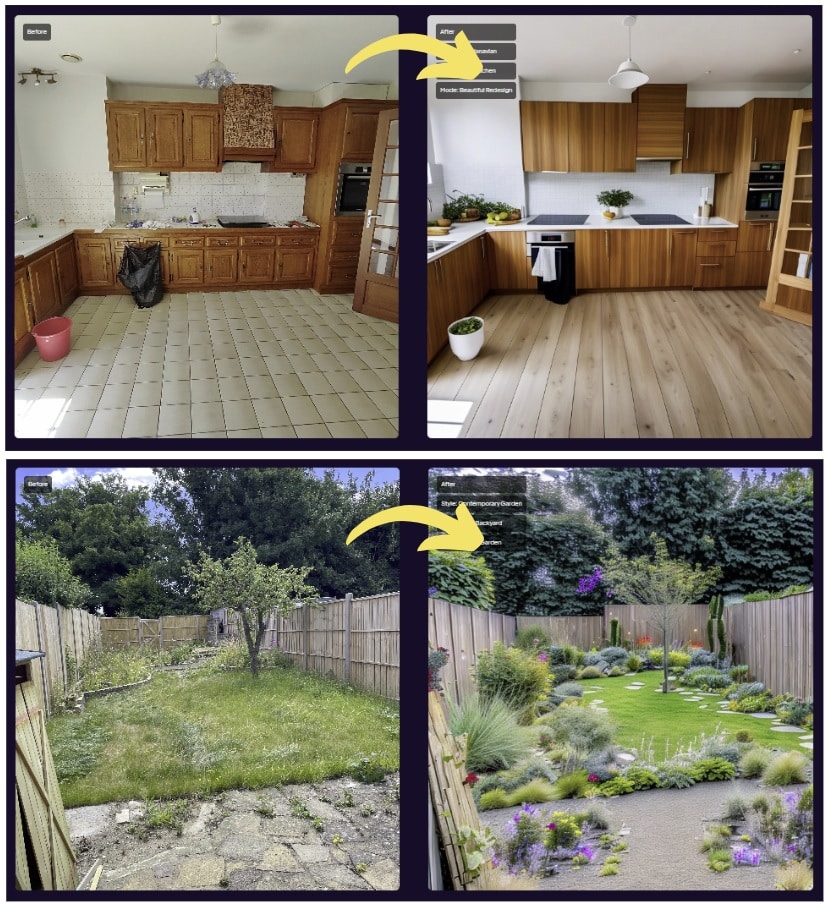
Among the notable options we can select for creating the decorated environment is:
- The type of room: We can add living room, kitchen, bathroom, bedrooms, balcony, etc. And in addition, we can specify a little more with reference to the room, we can select restaurant, office, gym, café, attic, etc.
- AI intervention: It proposes four levels of algorithm intervention, from low to very creative.
- Representation mode: Where we can select three levels of intensity to restructure what we will have within the image.
- Design style: We can select the typical decoration styles such as eclectic, modern, minimalist, industrial, bauhaus, rustic, colonial, art deco, etc. The truth is, there is a wide range.
- Number of designs: And how many proposals the AI will create for us (currently there are four maximum)
Unfortunately! Currently, only the premium version is available for users (they have removed the three trial images). You can access the Home Designs application from HERE.
7.- Interior AI
Another of the AI software for decorating most advanced on the market. The most notable advantage is that with a simple photo you can try 30 different interior design styles, and easily.
It serves both for interior decorations and to provide ideas for the exterior; garden, terraces, etc. It is very simple and quick to use. From an original image, we have tried the zen, vintage, and industrial style….
All the decorative styles you can apply in your project with artificial intelligence are the following:
| Decoration styles with Interior AI | ||
| Christmas | Bohemian | Vaporwave |
| Modern | Cottagecore | Farmhouse |
| Minimalist | Cyberpunk | Vintage |
| Tropical | Art deco | Baroque |
| Scandinavian | Rustic | Sketch |
| Zen | Game room | Coastal |
| Mid-century modern | Maximalist | French country |
| Contemporary | Japanese design | Tribal |
| Industrial | Art Nouveau | Medieval |
| Biophilic | Ski chalet | Halloween |
They have gone from being a Free – Premium type tool with 5 free trials, to only paid. You can access Interior AI from HERE ¡you have to try it!
🟧 Note: You can see more information about this tool in the article on interior design with AI.
8.- Air Room Planner
In this case, we are directly facing a free AI decoration program, and it stands out for its simplicity since it only has two customization options.
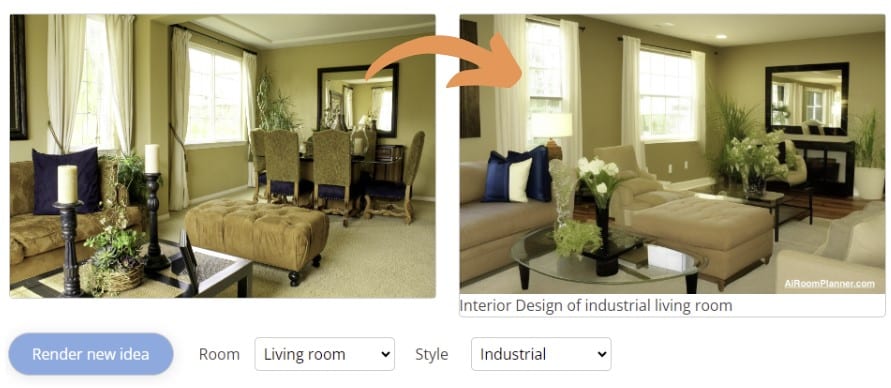
We just have to register, upload the image, indicate the type of room and the decorative style we want to create ¡and that’s it! there is no more. We can access Air Room Planner from HERE.
9.- Room GPT
In this application to decorate with artificial intelligence we have three free trials. It is one of the simplest tools available, with few options to customize the result, but it provides interesting renders.
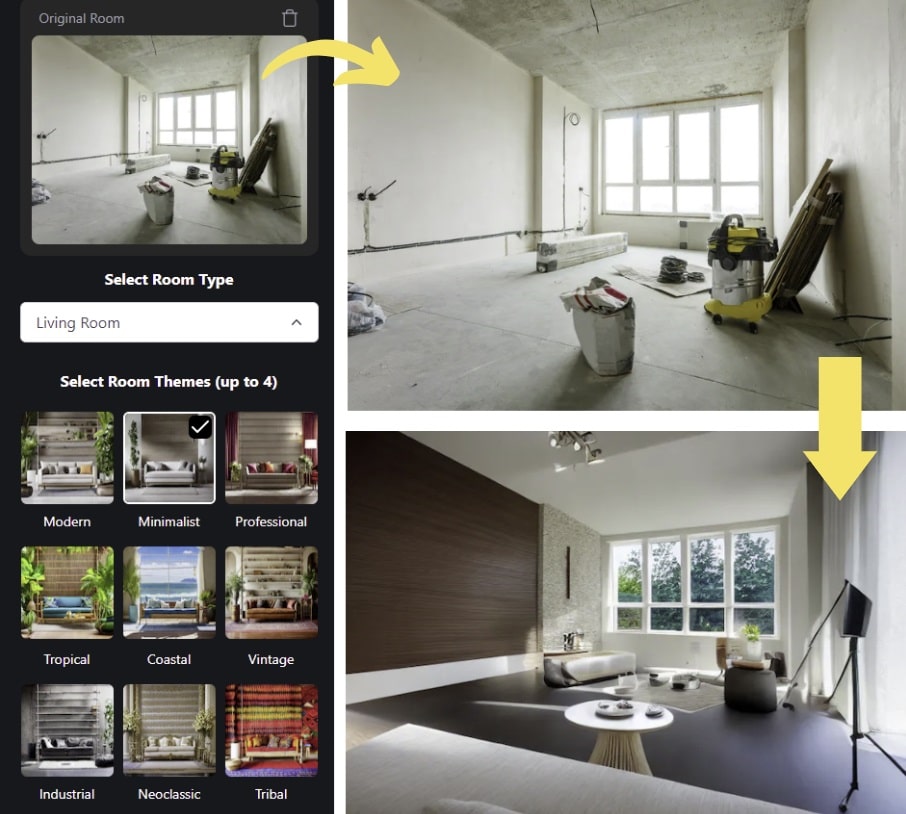
The steps to follow to visualize a presentation are:
- We register in the RoomGPT application from HERE.
- We upload the image we want to process in the “upload and image” section
- We select the type of room we are going to retouch; living room, kitchen, bathroom, garden, bedroom, etc.
- We select the type of decoration style; modern, minimalist, vintage, professional, industrial, etc.
- And we start rendering the image ¡there is no more!. You can improve the presentation with Microsoft Designer very easily.
For how simple the tool is ¡straight to the point! and the few options it presents, the results are not bad at all.
10.- Spacely
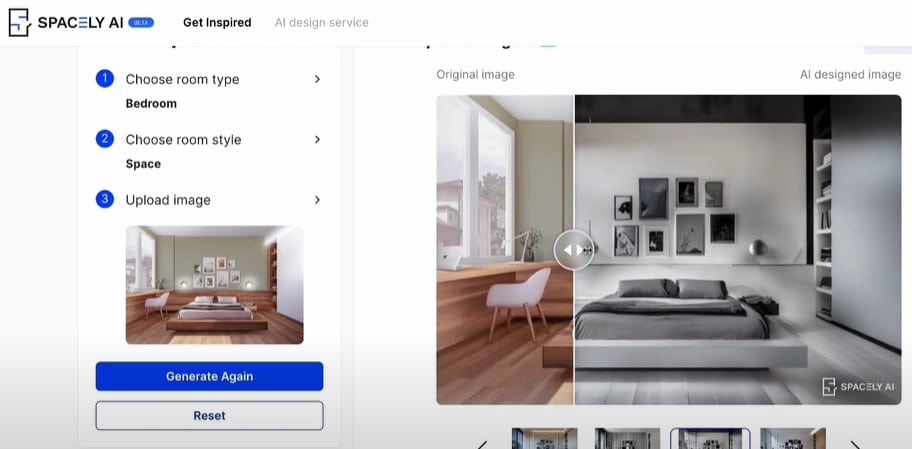
In this case, the tool specializes in rendering interior spaces: bedrooms, bathrooms, living rooms, kitchens, etc., and allows comparing “before and after” views. You can access Spacely from HERE.
11.- Room AI
This AI-powered interior design app has been talked about a lot recently. It offers a wide range of filters, elements, and applications for interior design. You can access Room AI here.
It offers an interesting palette of materials to apply on walls, floors, furniture, etc. Excellent!
12.- Wizart AI
Although Wizart offers various options for applying AI in interior design, we highlight its powerful color and material visualizer or its furniture integration into room designs for potential sales.
The app allows you to create your own AI-powered decor store.
Additionally, it uses augmented reality (AR) and virtual reality (VR) technologies to let customers visualize how products would look in their interiors before purchasing. You can access Wizart here.
13.- Archi AI
This online AI interior and exterior design tool allows users to transform their spaces easily and professionally; simply upload a photo and start working! You can access Archi AI here.
🟧 Note: In this article, we have seen tools specialized in artificial intelligence for decoration. There are other software that consider being able to make a floor sketch, add dimensions, furniture, etc., and transform it into 3D, but they are not really driven and dedicated AI tools.
For your knowledge, apart from the professionals like AutoCAD, Sketchup, or ArchiCAD, we can name; Planner 5D, Smartdraw, IKEA Place, Home by me, Havenly, or the app for decoration with AI from Hutch.
If you are more curious, check the article on artificial intelligence for architecture where we explain how it is being used.
If you liked the article, share it!